Bridges
To make use of any schema, uniforms have to create a bridge of it - a unified schema mapper.
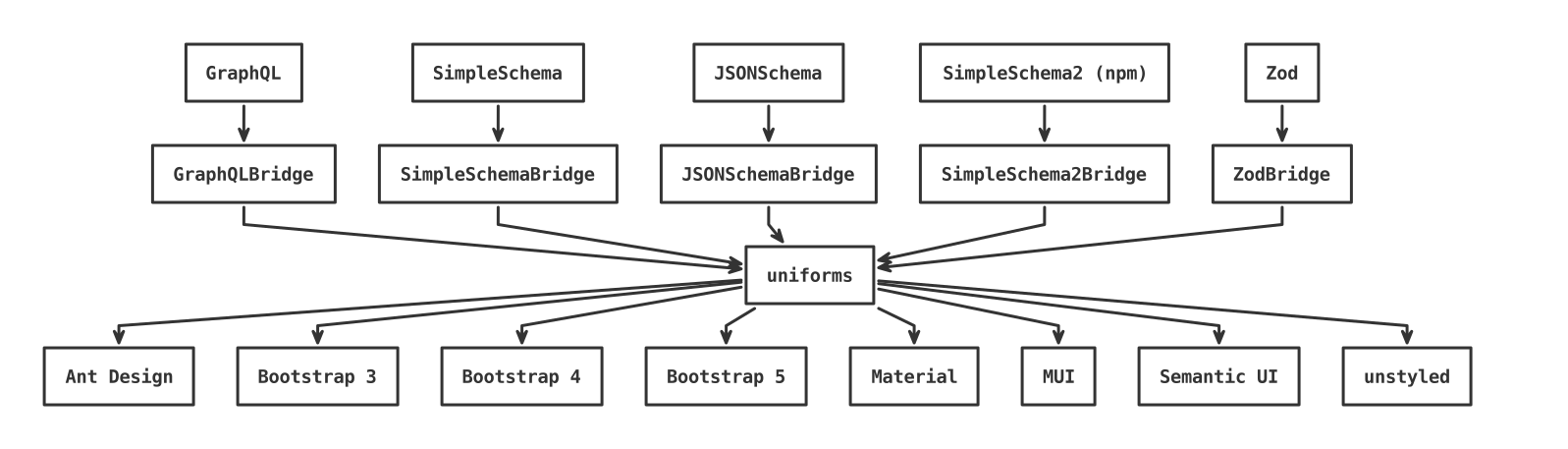
Currently available bridges:
GraphQLBridgeinuniforms-bridge-graphqlJSONSchemaBridgeinuniforms-bridge-json-schemaSimpleSchema2Bridgeinuniforms-bridge-simple-schema-2SimpleSchemaBridgeinuniforms-bridge-simple-schema
If you see a lot of Warning: Unknown props... logs, check if your schema or theme doesn't provide extra props. If so, consider registering it with filterDOMProps.
GraphQLBridge
This bridge enables using GraphQL schema types as uniforms forms.
This saves you from not having to rewrite the form schema in your code.
As a trade-off, you have to write the validator from scratch. In some cases, it might be easier to rewrite the schema and use, for example, JSONSchemaBridge with ajv.
If only a simple or no validation is needed, this bridge is perfectly suited to work with GraphQL schemas.
The constructor accepts three arguments:
schema: GraphQLTypecan be any type parsed and extracted from a GraphQL schema.validator: (model: Record<string, any>) => anya custom validator function that should return a falsy value if no errors are present or information about errors in the model as described in the custom bridge section.extras: Record<string, any> = {}used to extend the schema generated from GraphQL type with extra field configuration.
Code example
import { GraphQLBridge } from 'uniforms-bridge-graphql';
import { buildASTSchema, parse } from 'graphql';

const schema = `
    type Author {
        id:        String!
        firstName: String
        lastName:  String
    }

    type Post {
        id:     Int!
        author: Author!
        title:  String
        votes:  Int
    }

    # This is required by buildASTSchema
    type Query { anything: ID }
`;

const schemaType = buildASTSchema(parse(schema)).getType('Post');
const schemaExtras = {
  id: {
    allowedValues: [1, 2, 3],
  },
  title: {
    options: [
      { label: 1, value: 'a' },
      { label: 2, value: 'b' },
    ],
  },
  'author.firstName': {
    placeholder: 'John',
  },
};

const schemaValidator = (model: object) => {
  const details = [];

  if (!model.id) {
    details.push({ name: 'id', message: 'ID is required!' });
  }

  if (!model.author.id) {
    details.push({ name: 'author.id', message: 'Author ID is required!' });
  }

  if (model.votes < 0) {
    details.push({
      name: 'votes',
      message: 'Votes must be a non-negative number!',
    });
  }

  // ...

  return details.length ? { details } : null;
};

const bridge = new GraphQLBridge(schemaType, schemaValidator, schemaExtras);
JSONSchemaBridge
import Ajv from 'ajv';
import { JSONSchemaBridge } from 'uniforms-bridge-json-schema';

const ajv = new Ajv({ allErrors: true, useDefaults: true });

const schema = {
  title: 'Person',
  type: 'object',
  properties: {
    firstName: { type: 'string' },
    lastName: { type: 'string' },
    age: {
      description: 'Age in years',
      type: 'integer',
      minimum: 0,
    },
  },
  required: ['firstName', 'lastName'],
};

function createValidator(schema: object) {
  const validator = ajv.compile(schema);

  return (model: object) => {
    validator(model);
    return validator.errors?.length ? { details: validator.errors } : null;
  };
}

const schemaValidator = createValidator(schema);

const bridge = new JSONSchemaBridge(schema, schemaValidator);
Note on allOf/anyOf/oneOf
The current handling of allOf/anyOf/oneOf is not complete and does not work with all possible cases. For an in-detail discussion, see #863. How it works, is that only a few properties are being used:
properties, where all subfields are merged (last definition wins),required, where all properties are accumulated, andtype, where the first one is being used.
Below is an example of these implications:
{
  "type": "object",
  "properties": {
    // This will render `NumField` WITHOUT `min` nor `max` properties.
    // It will be properly validated, but without any UI guidelines.
    "foo": {
      "type": "number",
      "allOf": [{ "minimum": 0 }, { "maximum": 10 }]
    },
    // This will render as `TextField`.
    "bar": {
      "oneOf": [{ "type": "string" }, { "type": "number" }]
    }
  }
}
Note on Bluebird
If you're using the bluebird package, you may have seen the following warning (docs):
Warning: a promise was rejected with a non-error [object Object]
In order to fix it, your validator function should return a Error-like object instead of an object with a single details property. The cleanest would be to create a custom ValidationError class:
import { ErrorObject } from 'ajv';

class ValidationError extends Error {
  name = 'ValidationError';

  constructor(public details: ErrorObject[]) {
    super('ValidationError');
  }
}

// Usage.
return validator.errors?.length ? new ValidationError(validator.errors) : null;
See #1047 for more details.
SimpleSchema2Bridge
import SimpleSchema from 'simpl-schema';
import SimpleSchema2Bridge from 'uniforms-bridge-simple-schema-2';

const PersonSchema = new SimpleSchema({
  // ...

  aboutMe: {
    type: String,
    uniforms: MyText, // Component...
    uniforms: {
      // ...or object...
      component: MyText, // ...with component...
      propA: 1, // ...and/or extra props.
    },
  },
});

const bridge = new SimpleSchema2Bridge(PersonSchema);
SimpleSchemaBridge
import SimpleSchemaBridge from 'uniforms-bridge-simple-schema';
import { SimpleSchema } from 'aldeed:simple-schema';

const PersonSchema = new SimpleSchema({
  // ...

  aboutMe: {
    type: String,
    uniforms: MyText, // Component...
    uniforms: {
      // ...or object...
      component: MyText, // ...with component...
      propA: 1, // ...and/or extra props.
    },
  },
});

const bridge = new SimpleSchemaBridge(PersonSchema);